

(Universal Event Application – Standard Operating Procedures)
LOAD-IN PROCEDURES
- Preparation
- Read the Show File: Review all event details, stage plots, and cue notes before arrival.
- Locate Equipment: Identify all Laser Light Company cases and confirm quantities.
- Locate On-Site Contact: Introduce yourself to the stage manager or client representative.
- Plan Installation
Before unloading, develop a clear, safe installation plan:
- Determine the load-in path and safe area to stage gear out of the way.
- Confirm with the client or production team what look and configuration they expect.
- Evaluate what’s safe, feasible, and approved for your install.
- Verify nothing else will be added to the stage post-installation.
- Identify power locations or where the distro will be set up.
- Equipment Placement
- Begin stage right (standing on stage, facing the audience).
- Distribute lasers evenly from right to left, maintaining symmetry around center stage.
- Always prioritize safety, termination, and balance in placement.
- Cable Runs
Best completed after lasers are placed.
- Follow existing cable paths laid by other production teams.
- If no paths exist, route cables safely and discreetly — no trip hazards.
- Use gaff and electrical tape as needed to secure runs.
- When finished, walk the stage to confirm nothing is left out or unsafe.
- Return unused cables and parts to their correct cases for load-out.
Non-Rack Setup
- From the power location, run the first cable loom to Laser 1 (Stage Right).
- Daisy-chain each additional laser (Laser 2, Laser 3, etc.) in sequence.
Rack Setup
- From the Laser Rack location, run the first cable loom to Laser 1 (Stage Right).
- Daisy-chain lasers as above.
- Repeat for each additional chain of lasers.
- Front of House (FOH) Setup
- Verify cable ends are oriented correctly before connecting.
- Route the FOH loom through a cable ramp or crowd-free area.
- Confirm FOH placement with the stage manager or FOH lead.
- Maintain a tidy, organized workspace with the E-Stop easily reachable.
- Foggers & Fans
- Never direct fog output toward lasers, racks, or electronics.
- Keep fog/haze machines filled; do not run dry.
- Fans should remain on “3” speed; adjust fog density as needed.
- Empty fog machines completely before shipping.
- Laser Zoning
- Post caution signs, notify stage management, clear the stage, and assign a qualified safety spotter.
- Check for people, cameras, and termination areas before zoning.
- Begin with small, safe zones, then expand as verified.
- Maintain symmetry and safety compliance throughout adjustments.
✅ Have a Great Show!
- LOAD-OUT PROCEDURES
(Do not power down lasers or foggers until after cables are wrapped; allow cool-down time.)
- Pack cables, rack, and distro (if applicable).
- Pack lasers after cables are complete.
- Pack fog machines, fans, and support gear.
- Inspect stage and venue for any items left behind.
- Verify equipment inventory before closing cases.
- Prepare gear for outbound shipment per logistics instructions.
- Complete the Show Report for your records.
- ✅ Get Some Rest — You’ve Earned It.
POWER REQUIREMENTS
- 110V AC Only (standard voltage)
- Confirm circuits before connection; balance loads across available power.
DAISY-CHAIN RULES
| Laser Power Range | Maximum Units per Chain |
| 3w Lasers | Up to 8 units |
| 6w – 15w Lasers | Up to 6 units |
| 20w – 60w Lasers | Up to 4 units |
LASER TEAM – CHEAT SHEET
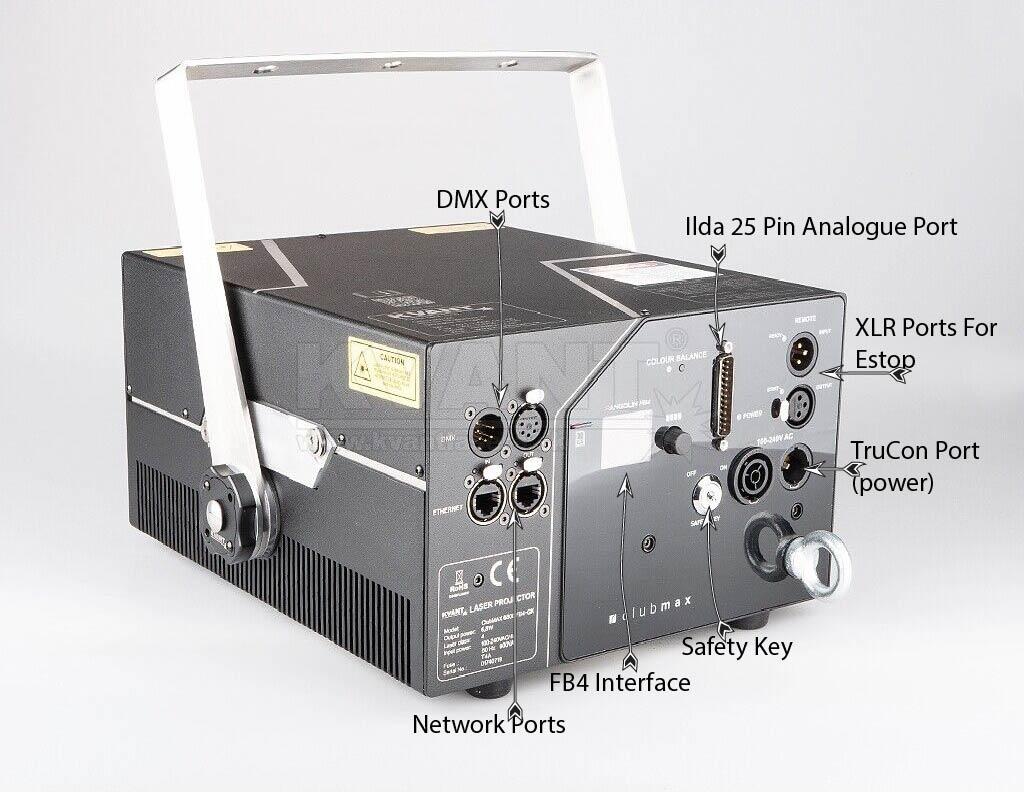
CABLE INVENTORY
Cable lengths are approximate; verify and label during prep and teardown.
| Cable Size | Length Range | Cable Types |
| XXL | 300ft | 2 × Cat5, DMX |
| XL | 85–100ft | True1, Cat5, DMX |
| L | 50ft | True1, Cat5, DMX |
| M | 25–35ft | True1, Cat5, DMX |
| S | 10–20ft | True1, Cat5, DMX |
| XS | 5–10ft | True1, Cat5, DMX |
⚠️ Important:
If a cable barrel must be disassembled, keep all internal parts together and return them to the Tool Kit immediately after use.
EQUIPMENT KITS
Each kit is color-coded for quick identification. Always double-check inventory before and after each show.
FOH Kit (You)
Contents:
- 2 × Computers
- 1 × Laser Controller
- 1 × BEYOND License
Power Spec: 20 AMP / Personal Bag
3W – 15W Laser Case
Contents:
- 2 × KVANT Clubmax Lasers
- 2 × Keys
- 2 × True1 → Edison Adapters
- 2 × Ratchet Straps
- 2 × Trigger Clamps
- 2 × Safety Cables
Specs: 31″ × 21″ × 15″ @ 65 lb / 6 AMP
20W – 60W Laser Case
Contents:
- 1 × KVANT Spectrum or Atom Laser
- 1 × Key
- 1 × True1 → Edison Adapter
- 1 × Ratchet Strap
- 1 × Trigger Clamp
- 1 × Safety Cable
Specs: 25″ × 20″ × 15″ @ 90 lb / 10 AMP
Cable Case (Green)
Contents:
- 1 × 100 ft Cable Loom (Cat5, DMX, True1)
- 3 × 50 ft Cable Looms
- 3 × 25 ft Cable Looms
- 1 × True1 → Edison Adapter
- 1 × Extension Cord
- 1 × Cat5 Cable
- 1 × Power Strip
- 1 × Trash Bag Roll
- 1 × Caution Sign Packet
- 1 × Tool Kit (E-Stop, 2 Keys, 2 Interlocks, 4 Barrels, Short DMX, Ethercon Adapter, BCs, Gaff Tape, E-Tape, Tri-Tap)
Specs: 25″ × 20″ × 15″ @ 110lb
Rack Case (Red)
Contents:
- 1 × Laser Rack (8-Port Ethercon / 8-Port KVANT Rack)
- 1 × FOH Switch (Barrel, Power, Ethercon to Net)
- 1 × 300 ft Cable Loom (2 × Cat5, DMX)
- 1 × Socopex (True1 Breakout)
- 1 × Extension Cord
- 1 × Cat5 Cable
- 1 × Power Strip
- 4 × Short Cable Looms (Extras)
- 1 × Tri-Tap
Specs: 33″ × 22″ × 13″ @ 100lb / 20 AMP
Fog Machine Case (Blue)
Contents:
- 1 × NT Viper Fog Machine (with fluid)
- 1 × Extension Cord
- 1 × Tri-Tap
Specs: 25″ × 20″ × 15″ @ 55lb / 11 AMP
Fan Case (Black)
Contents:
- 2 × Floor Fans
Specs: 25″ × 19″ × 12″
FINAL CHECKLIST
- ✅ All gear accounted for
- ✅ Stage area cleared
- ✅ Power disconnected properly
- ✅ Safety signage removed
- ✅ All cases labeled and latched
- ✅ Show Report completed
Variance
Artnet Setup
Artnet sACN Setup (Mar 2026) PDF
Artnet sACN Setup (Mar 2026) DOCX
Timeline
Fog Trick
FAA Field Instructions